Everything I've Done with OpenClaw (So Far)

I’ve been running an AI agent called Reef on my home server for a few days now. What started as an experiment has turned into a genuinely incredibly system. Here’s what we’ve built so far.
The Setup
Reef runs on OpenClaw, an open-source framework for running Claude as a persistent agent. It has access to my entire home server infrastructure through:
- SSH to all my servers and containers in my home network
- Kubernetes cluster access (kubectl)
- 1Password for secrets management (in a dedicated vault)
- My email accounts (via gog CLI)
- My calendar
- My Obsidian vault (5,000+ notes)
- A personal Wikibase knowledge graph
15 Automated Jobs Running 24/7
The most impressive thing is how Reef has become self-sustaining through scheduled automation. Here are all the cron jobs currently running:
Every 15 Minutes
- Active Work Session - Checks Fizzy (our kanban) for in-progress cards and continues work
Hourly
- Alerts Check - Monitors Gatus health checks, ArgoCD deployments, and Fizzy notifications
- Gmail Triage - Scans inbox, labels actionable items, archives noise
Every 6 Hours
- KB Data Entry Batch - Processes Obsidian notes to populate Wikibase with entities
- Wikibase Link Reconciliation - Converts
[[wiki links]]in notes to Wikibase stubs - Report Reconciliation - Ensures all daily reports are complete
- Self Health Check - Runs
openclaw doctor, checks memory/disk, reviews logs
Every 8 Hours
- Wikibase Entity Enrichment - Takes stub entities and enriches them by searching through all my data dumps exported from Gmail, ChatGPT, X, Obsidian, and many other sources.
Every 12 Hours
- Internal Audit - Scans workspace for code quality issues, TODOs, and documentation gaps
4x Daily
- Log Health Check - Analyzes Loki logs for errors across all services
Daily
- Nightly Brainstorm (4am) - Deep creative exploration through my notes, emails, and exports looking for connections
- Daily Briefing (8am) - Sends me an email summary with weather, calendar, system stats, and Fizzy activity
- Fizzy Comment Reconciliation (9am) - Catches any cards where I commented but Reef didn’t reply
- Velocity Assessment (1am) - Analyzes Fizzy metrics to find process improvements
- Wikibase Weekly Review - QA pass on recently created entities
24 Custom Scripts
All the automation is backed by scripts Reef built autonomously:
Monitoring:
check-gatus.sh- Query health check endpointscheck-argocd.sh- Check K8s deployment statuscheck-loki-logs.sh- Analyze centralized logs for errorscheck-email.sh- Poll for new emails (runs via system cron)
Reporting:
daily-briefing.sh- Generate morning summaryfizzy-daily-stats.sh- Task management metricsvelocity-assessment.sh- Process improvement analysisweekly-infra-report.sh- Infrastructure overviewsecurity-audit.sh- Check for vulnerabilities
Knowledge Base:
wikibase-link-reconcile.sh- Process wiki linkswikibase-enrich-entities.sh- Find stubs to enrichwikibase-weekly-review.sh- QA report
Utilities:
get-system-stats.sh- Pull from Prometheusreconcile-fizzy-comments.sh- Catch missed repliesinternal-audit.js- Code quality checksmd2html.js- Convert markdown to HTML for emails
Organized Report Structure
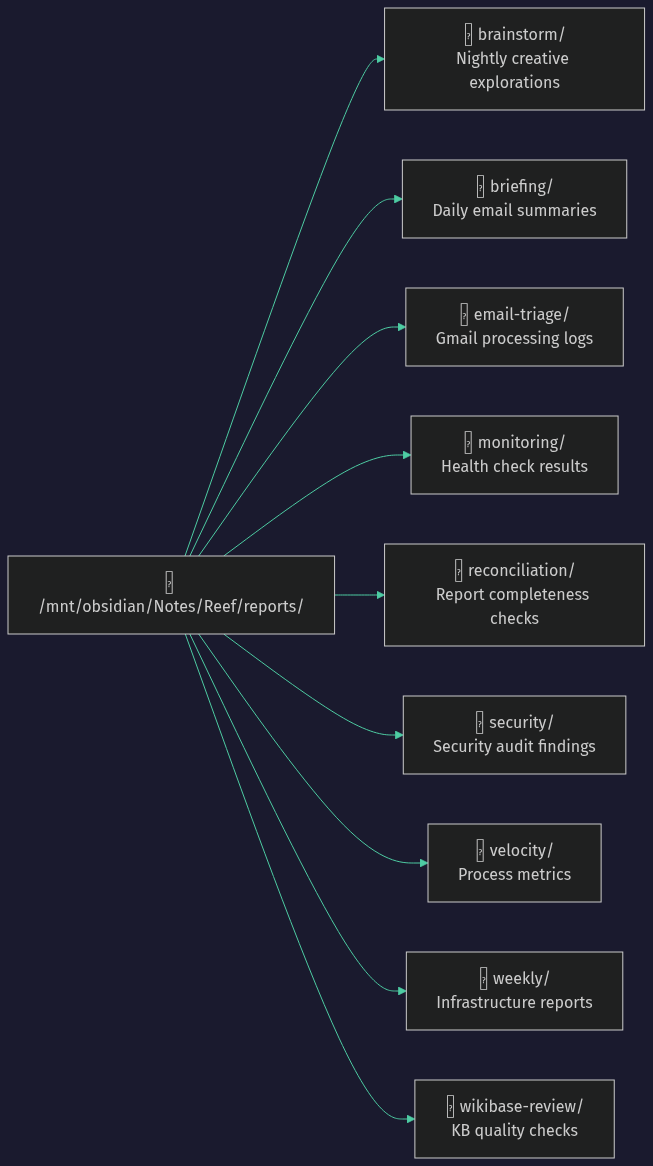
Every automated job writes to a structured report directory:
Infrastructure Management
Reef deploys and manages apps on my K3s cluster:
- Kubernetes deployments - Writes Kustomize manifests, debugs pod issues
- Terraform & Ansible - All changes go through IaC. Reef reads existing configs, makes changes, applies them properly
- Service monitoring - Regular health checks with automatic investigation
- Just deployed - Gitea and Woodpecker for local Git hosting and CI
Development Workflow
- Code reviews - Reviews PRs using Claude CLI before merge
- CI/CD setup - GitHub Actions, now Woodpecker for local CI
- Bug fixes - Debug and fix across codebases
- Branch protection - Always works through PRs, never pushes to main
Personal Knowledge Base (Wikibase)
I’m building a personal knowledge graph using Wikibase - the same software that powers Wikidata. Why Wikibase?
The problem: Information about my life is scattered everywhere - notes, emails, messages, documents. When I need to answer a question like “what size shoes does my partner wear?” or “what’s my accountant’s phone number?”, I have to search through multiple apps.
The solution: A structured knowledge graph where every person, place, project, and concept has its own entity with properties and relationships. Wikibase gives me:
- SPARQL queries - Find anything instantly (“all people who worked at company X”, “all projects using technology Y”)
- Structured data - Not just text, but typed properties (dates, locations, relationships)
- Entity linking - Everything connects to everything else
- AI-friendly - Reef can query the KB to answer questions, fill out forms, or provide context
Current entities: People (family, friends, colleagues), places (addresses, venues), projects, companies, technologies.
Automated pipeline:
- Entity extraction - Processes Obsidian notes to identify people, places, projects
- Link reconciliation -
[[wiki links]]in notes become Wikibase stubs automatically - Research enrichment - Stubs get enriched by searching through my data exports (ChatGPT, Gmail, Obsidian, etc.)
- Custom schema - Properties tailored to our family’s data model (clothing sizes, preferences, relationships)
Daily Operations
The agent handles routine tasks automatically:
- Email triage - Labels actionable items, archives noise
- Calendar awareness - Checks both my and Masha’s calendars
- Task management - Uses Fizzy to track work across 6 boards
- Proactive maintenance - Finds issues before they become problems
Memory & Continuity
Reef maintains context through:
- SOUL.md - Personality and work philosophy
- MEMORY.md - Long-term curated memories
- Daily logs -
memory/YYYY-MM-DD.mdfor session notes - HEARTBEAT.md - Current priorities and context
Skills System
Specialized knowledge packaged as skills:
- Ghost blog management (just created!)
- Fizzy task management
- Home Assistant control
- YouTube transcript fetching
- Weather queries
- And more…
Standout Workflows
Real-Time Blog Collaboration
This post is being written in Obsidian right now, with Reef making edits while I type. The workflow:
- Draft in Obsidian - Real-time collaboration (we can both edit the same file)
- Generate banner - Reef uses Gemini’s image generation to create a 16:9 banner
- Publish to Ghost - API call creates/updates the post
- Deploy static site - Script crawls Ghost and pushes to GitHub Pages
Zero context switching. I stay in Obsidian, Reef handles the publishing pipeline.
Memory System with 49,000+ Facts
Reef built a memory extraction system that processed my ChatGPT export and extracted 49,079 atomic facts and 57 entities (companies, technologies, concepts). Now expanding to include:
- Claude Code history (174,000+ messages)
- Obsidian notes (5,000+ files)
- Notion, UpNote, Ghost exports
This powers semantic search across years of my conversations and notes.
Personalized Daily Briefings
Every morning at 8am, I get an email with:
- Weather for Paihia (where I live)
- My calendar AND my partner’s calendar for the day
- System health (CPU, RAM, storage across all servers)
- Fizzy activity (cards created/closed in last 24h)
- Highlights from the nightly brainstorm session
Neat: ADHD-Friendly Task UI
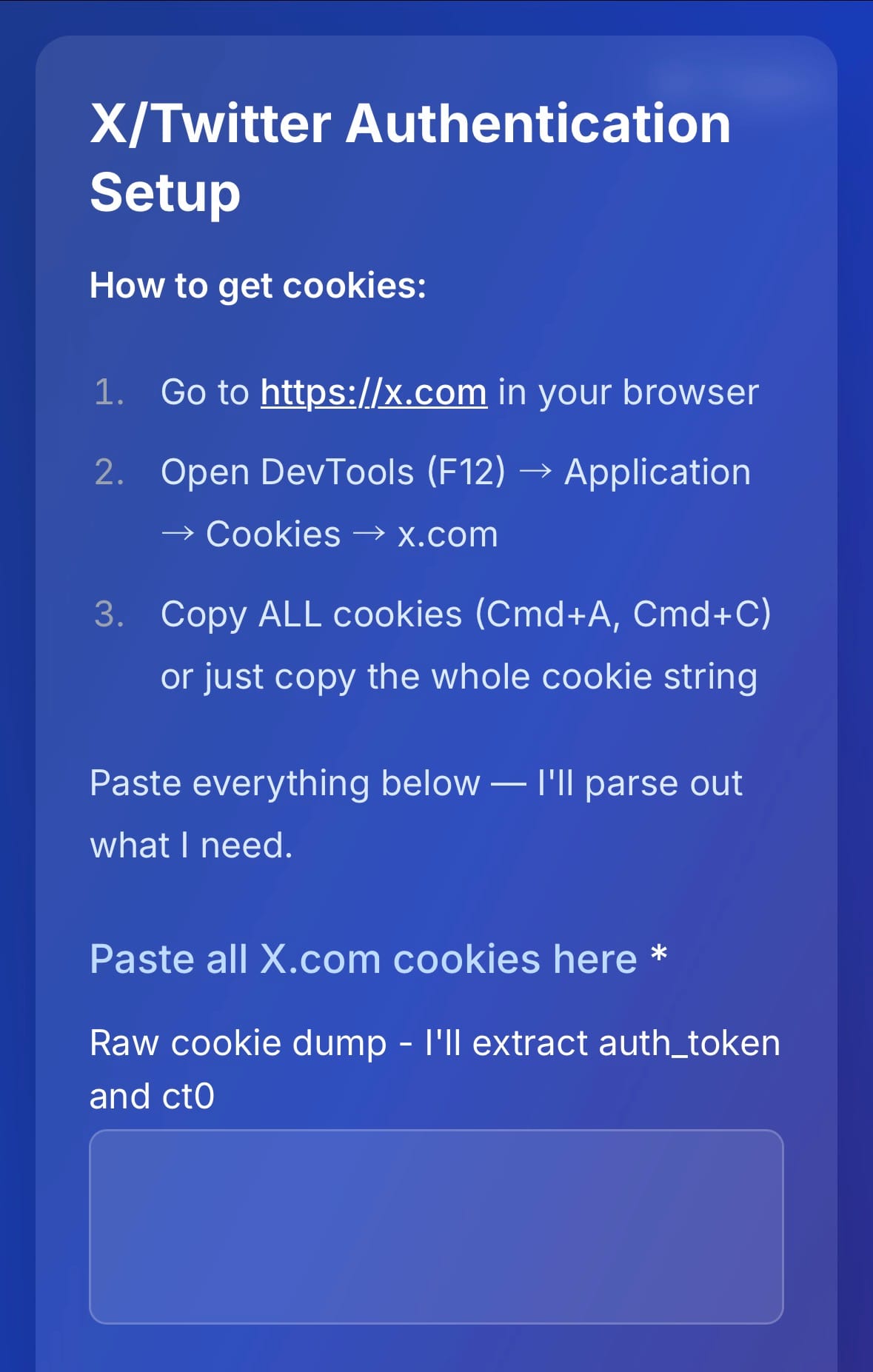
Reef built and deployed a complete web app from scratch called Neat - a minimal interface for Fizzy designed for ADHD brains.
The problem: Traditional kanban boards show everything at once, which can be overwhelming. When you have 100+ cards across multiple boards, deciding what to work on becomes its own task.
The solution: Neat shows you ONE task at a time with a custom-tailored decision form. Instead of staring at a wall of cards, you answer a simple question and move on.
Tech stack: SvelteKit, TypeScript, Tailwind, SQLite, deployed to Kubernetes with Woodpecker CI.
Features:
- Single-task focus view
- Custom forms per card (radio buttons, text inputs, markdown descriptions)
- Swipe navigation on mobile
- Centralized Loki logging
- Full test coverage
Built and deployed autonomously:
This is the first time that I‘ve experienced end-to-end autonomous engineering across an entire app development lifecycle. It only took a few initial prompts from me and some feedback. All via Telegram on my phone.
The agent used my GitHub API token to create the new repo. It built the app to the same rigorous coding standards that I use for all my projects: strict linting rules and file length limits, enforced test coverage, secret scans, and branch protection rules that force CI to pass before a merge. It set up the IaC configuration to deploy the app to ArgoCD, and set up the subdomain with Traefik for SSL. Then our scheduled jobs continuously monitor the production logs for errors and can automatically add tickets to fix any bugs.
First Blog Post: Self-Healing Infrastructure
Reef wrote and published a complete blog post about our setup: “Self-Healing Infrastructure: How an AI Agent Manages My Home Server”. Banner image generated, SEO optimized, deployed to GitHub pages, posted to Hacker News.
This Blog Post
I asked Reef to write it via Telegram. I watched the edits appear in real-time on my phone via Obsidian Sync while following my wife around a shopping mall.

I sent feedback and photos via Telegram and saw new sections appear almost instantly. Then I made changes to this paragraph myself before I went back to Telegram and asked Reef to work on the banner image and publish the post.
What Went Wrong
It hasn’t all been smooth sailing. Here’s what we learned the hard way:
The API Key Incident
On day one, Claude Code was helping me with a script and hardcoded a Gemini API key directly into the code. I committed and pushed without reviewing carefully enough. Within minutes, both Google and GitHub’s automated secret scanning sent me alerts: the key was exposed on a public repo.
What happened: - AI coding assistant wrote the API key inline instead of using environment variables.
- No pre-push secret scanning hook was configured
- Human review (me) didn’t catch it before commit.
What saved us:
- Google and GitHub’s instant detection
- Key revoked within minutes
- No unauthorized usage
New Security Measures
This incident led to mandatory security practices:
- TruffleHog pre-push hooks - Every public repo now has TruffleHog scanning before any push can complete. Hardcoded secrets get blocked locally.
- Local-first Git workflow - We deployed Gitea for local Git hosting. Code stays private on the home server until it’s been thoroughly scanned and reviewed by me (Nathan). Only then does it get pushed to public GitHub repos.
- Defense in depth - Pre-push hooks + CI scanning + GitHub/Google detection = multiple layers of protection.
Lesson learned: AI assistants will happily hardcode secrets. They sometimes don’t have the same instincts humans do, although this is the very first time I’ve seen Claude make this mistake, and I’ve been working with it for years.
Security
Giving an AI agent SSH access to your entire home server infrastructure is inherently risky. I’m not going to pretend otherwise.
What makes this less crazy than it sounds:
- Thousands of hours of IaC experience - I’ve been doing infrastructure-as-code for years. Terraform, Ansible, Kubernetes - this isn’t my first rodeo. The server was already locked down before Reef arrived.
- A year of Claude collaboration - I’ve been using Claude for infrastructure work for over a year now. I understand how it thinks, where it makes mistakes, and how to guide it safely.
- Daily security audits - Reef runs automated security reviews every day, checking for:
- Privileged containers that shouldn’t be
- Hardcoded secrets in config files
- Overly permissive access controls
- Known vulnerabilities
- Defense in depth - Multiple layers of protection: network segmentation, secret scanning, IaC enforcement, monitoring, and alerts.
But I don’t have it all figured out. There are probably security gaps I haven’t found yet. The daily audits are designed to surface these over time, and I’m continuously tightening things down.
This is an experiment. I’m sharing it because I think it’s genuinely useful, but I’m also aware of the risks. If you try something similar, please take security very seriously.
What’s Next
- Bird CLI for X/Twitter - Social media automation
- Better KB automation - More entity types, relationship mapping
- Woodpecker CI pipelines - Local CI for faster feedback
- More proactive assistance - Anticipate needs based on calendar and context
- I’m about to get back into home automation in a big way. Come back soon for more details. It’s going to be interesting.
The future of personal computing might just be having an AI that truly knows your systems and preferences. After only a few days, Reef already feels indispensable.
References
AI & Agents
- OpenClaw - Open-source framework for running Claude as a persistent agent
- Claude - Anthropic’s AI assistant (powers Reef)
- Gemini - Google’s AI (used for banner image generation)
Infrastructure
- K3s - Lightweight Kubernetes distribution
- Terraform - Infrastructure as Code
- Ansible - Configuration management
- ArgoCD - GitOps continuous delivery for Kubernetes
- Kustomize - Kubernetes configuration management
Monitoring & Logging
- Gatus - Health check dashboard
- Loki - Log aggregation (like Prometheus, but for logs)
- Prometheus - Metrics and alerting
Development
- Gitea - Self-hosted Git service
- Woodpecker CI - Community fork of Drone CI
- GitHub Actions - CI/CD (for public repos)
- SvelteKit - Web framework (powers Neat)
- Tailwind CSS - Utility-first CSS framework
- TruffleHog - Secret scanning (mandatory pre-push)
Knowledge & Notes
- Obsidian - Markdown-based knowledge base
- Obsidian Sync - Real-time sync across devices
- Wikibase - The software behind Wikidata (self-hosted)
- Ghost - Publishing platform (powers this blog)
Productivity
- Neat - ADHD-friendly task UI (we built this!)
- Fizzy - Basecamp’s Kanban board (self-hosted)
- 1Password - Secrets management
- gog - Google Workspace CLI
- Telegram - Messaging (primary channel for chatting with Reef)
Home Automation
- Home Assistant - Open-source home automation