Claude Code usage limits: rotating 50 sessions across accounts

I usually have 40 to 60 Claude Code sessions open at once, each working on its own branch, and they get through a lot of usage. I have several Claude subscriptions, and for a while I moved sessions between them by hand: I'd notice that one account was nearly out for the week, run /login in a few sessions, and forget about the rest until they stopped with a usage limit error.
Then I found claude-account-rotator by Ivo Kund. It's a Claude Code mod that shows each account's usage under the prompt and moves a session to another account before the one it's on runs out. It worked well for a few sessions. With 50 of them, I ran into problems that only show up at that scale, so I forked it.
How the account rotator works
Mods are Claude Code's newer plugin format: a TypeScript module that can hook into Claude Code's events and draw parts of its interface. They're still early access. The account rotator draws a row of usage bars in the footer, one per account, and a panel where you add accounts, sign in and pick how rotation works.
Each account you add gets its own folder, such as ~/.claude/accounts/2. Claude Code keeps an account's sign-in in the macOS keychain under that folder's name, as it does for any config folder. To switch a session to another account, the mod points the session at that account's sign-in. Claude Code caches its keychain read for 30 seconds, so a switch takes effect about 35 seconds later, without restarting the session or losing the conversation.
The mod reads each account's usage from the same endpoint Claude Code's /usage command uses. When the account a session is on is nearly out, the mod switches the session to another one and shows a notice saying which and why. If a turn still hits a usage limit, it switches and asks Claude to carry on.
50 sessions, each checking every account
In the original mod, every session did all of this on its own. When a session started, and every 10 minutes after that, it read every account's sign-in from the keychain and fetched every account's usage. With 50 sessions, each account's usage was fetched 50 times every 10 minutes, and all at once whenever I restarted my sessions.
That's a lot of calls to an endpoint with its own rate limit. It answers HTTP 429 when you call it too often, and once it sent a Retry-After header asking me to wait an hour.
One coordinator for every session
The fork's main change is a coordinator: one background process on the Mac that every session talks to over a Unix socket. It reads each account's sign-in and fetches its usage once, for all sessions, at most every 5 minutes. Sessions also send it the usage their own responses report, which keeps a busy account's reading fresh without any extra calls. The coordinator then tells every session where sessions on a spent account should go, so they all make the same choice.
Sessions follow the coordinator with a long poll, so every footer updates as soon as anything changes. Claude Code aborts a mod's HTTP request after 30 seconds, so each poll waits at most 25 seconds before it returns and starts again. The first session that needs the coordinator starts it, or you can install it as a launchd agent so it runs from login.
Each session still points its own requests at an account, reads the usage its responses report and connects Claude in Chrome, since only the session can do those.
I still managed to hammer the usage endpoint with the coordinator in place. When I first turned on the new soonest reset rotation (more on that below), every session moved to the same account at once. A session marks a switch as waiting until a response confirms it, and while it waited, it asked the coordinator for fresh usage once a minute. Idle sessions never get a response, so they kept asking for hours. The coordinator shared one call between all of them, but its cache only lasted 30 seconds, so it still called the endpoint about every 30 to 60 seconds. On 9 November that came to 247 rate-limited calls in a little over three hours.
Now only a response asks for fresh usage, every session shares one call per account per minute, and after a failed call the coordinator waits two minutes, doubling up to 15 minutes, or as long as Retry-After says.
A menu bar app
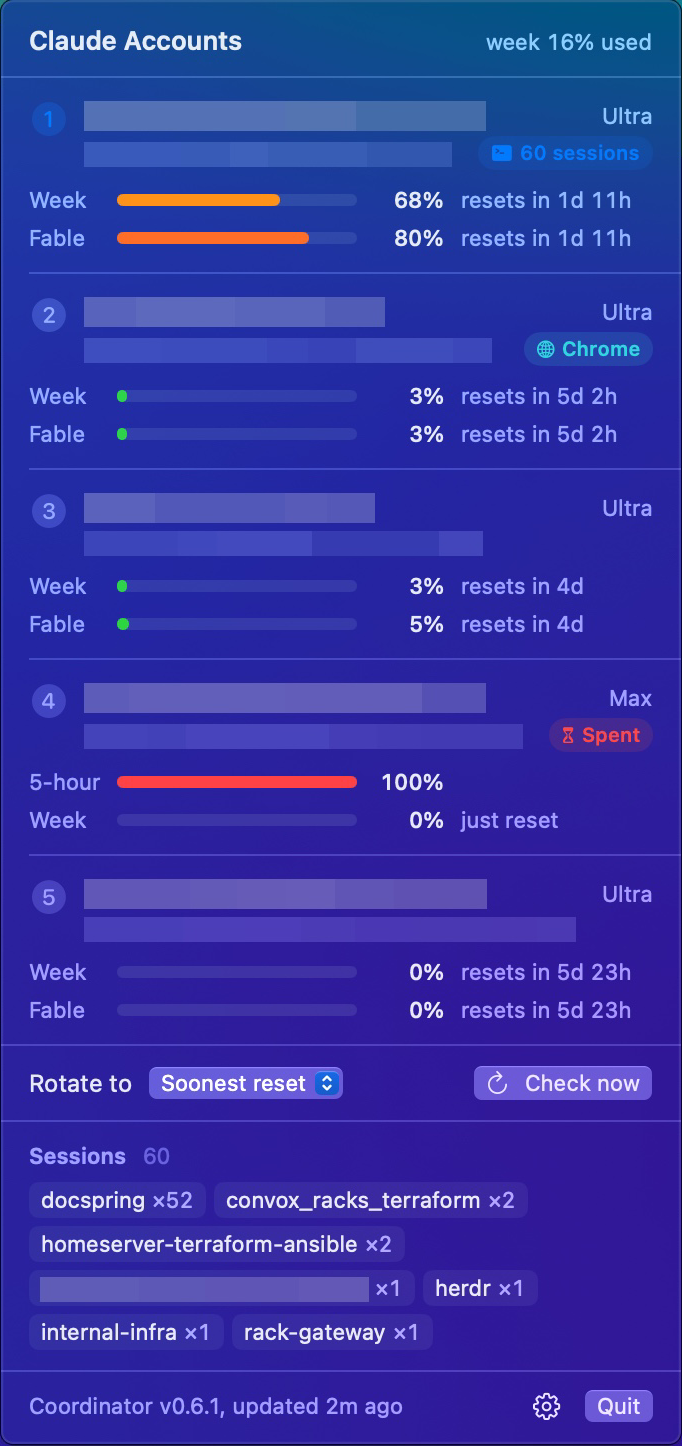
The fork also has a small SwiftUI app for the macOS menu bar. The menu bar shows my combined weekly usage across every account, and clicking it shows each account's usage and reset time, a sign-in button when one is needed, the rotation setting, and which project folders my sessions are working in. Each account counts by the size of its plan, as Anthropic sizes their weeks: an Ultra account counts twice as much as a Max account.
Weekly limits, and the week that resets first
As of November 2026, Anthropic's Ultra plan has no 5-hour window, only a weekly limit, and the $100 Max plan still has both. The fork shows only the week by default, shows a 5-hour window only for an account whose plan has one, and moves a session on once its account is at 98% of its week.
The original mod could already pick the account whose window resets soonest, but only when a session had to leave its account. Whatever is left of a week when it resets is lost, so I wanted every session on the account whose week resets first, all the time. With soonest reset in the fork, a session moves to the account whose week resets at least an hour sooner than its own, as long as that account has room. That includes start-up: a new session always starts on Claude Code's own sign-in, and the mod moves it within a minute. A session moves only when an account fills up or resets, so its own usage going up doesn't move it.
Fable has its own weekly limit
Fable has a weekly limit of its own, on top of the account's week, and with a lot of Fable sessions it runs out first. The rotation only looked at the account's week, so my Fable sessions stayed on an account whose Fable week was spent, and I paid for it when the auto top-up for usage credits kicked in.
The usage endpoint does report it. Next to the familiar seven_day figure, its response now has a limits list with a separate weekly entry scoped to Fable:
{
  "kind": "weekly_scoped",
  "group": "weekly",
  "percent": 100,
  "severity": "critical",
  "resets_at": "2026-11-12T02:59:59.743553+00:00",
  "scope": { "model": { "id": null, "display_name": "Fable" }, "surface": null },
  "is_active": true
}
On that account the week was at 80% while Fable's was at 100%. Another field in the same response says Fable can use half of the account's week.
Claude Code's responses don't include the Fable figure, so the coordinator reads it from the usage endpoint. The mod reads which model each session is running, and a session on Fable now moves on once either week reaches 98%, picking the next account by whichever week has less room. Sessions on Opus or Sonnet go by the account's week alone, so they keep using an account whose Fable week is spent. While a Fable session's account is past 80% of its Fable week, each response asks for fresh usage, still capped at one call per account per minute. The panel and the menu bar show each account's Fable week under its week.
Claude in Chrome
The Claude extension in Chrome is signed in to one claude.ai account and only answers Claude Code connections made as that account. The original mod already handled this: as a session opens, it visits the extension's account, connects Claude in Chrome there, and the connection stays as the session moves on.
I changed two things. After connecting, a session now goes straight to the account whose week resets soonest, where it used to go back to the account it started on first. And when the connection drops, Claude Code sometimes reports "Browser extension is not connected" as an ordinary result instead of an error, which the mod missed. It now catches the message either way, and treats an empty list of connected browsers as a drop too, so it reconnects and tells Claude to carry on.
Setting it up
The fork installs like any Claude Code plugin:
/plugin install account-rotator --marketplace ndbroadbent/claude-account-rotator
Turn on auto-update for the marketplace in /plugin, or you'll stay on the version you installed. Then click the usage in the footer, press + Add an account, and approve the sign-in in your browser. The account you're signed in with now is account 1. The panel only opens with a click, so Claude Code needs to run in its fullscreen renderer (/tui fullscreen).
To keep the coordinator running from login, which the menu bar app needs, install it as a launchd agent. It needs Node.js 22.18 or later:
node ~/.claude/plugins/marketplaces/claude-account-rotator/coordinator/cli.ts install
The menu bar app builds from source with the Xcode command line tools:
git clone https://github.com/ndbroadbent/claude-account-rotator.git
cd claude-account-rotator
menubar/install.sh
cli.ts status prints each account's usage, its Fable week, its sessions, and where sessions on it would move.
Things to watch out for
Sessions on a Team seat can't switch
Claude Code stops plugins from switching accounts for the rest of a session that started on a Team or Enterprise seat. Keep your own /login a personal Pro or Max account, and add seats from the panel. The README lists the ways around it.
The model picker shows another account's models
The extra models in /model come from Anthropic's servers, for the account a session is signed in to. Claude Code keeps one copy of that list in ~/.claude.json for every session, so with sessions on different accounts, the picker shows whatever the last session to fetch it got. A session on an account whose Fable week is spent also can't switch to Fable: /model answers with a 429 and keeps the old model. Switch the session to an account with Fable room first, then pick the model.
It relies on Claude Code's internals
Mods are early access, and this one depends on where Claude Code keeps sign-ins and on the usage endpoint behind /usage. A Claude Code release can change either.
Anthropic's terms
When I read them in November 2026, Anthropic's Consumer Terms didn't forbid one person from holding more than one Claude account. They do forbid sharing an account's login details or letting anyone else use it, so add only your own accounts. They also forbid bypassing Anthropic's protective measures, and Claude Code's legal page says the usage limits of the Pro and Max plans assume ordinary, individual usage.
Every account I rotate between is my own subscription, which I pay for. The rotator signs accounts in only through Claude Code's own login and keeps no tokens of its own. It decides which of my accounts each session uses, and each account keeps its own limits. The fork's README has a longer section on the terms. My fork isn't affiliated with or endorsed by Anthropic.
Juggling several subscriptions is common: plenty of developers I follow on X do it with Claude and Codex. If Anthropic has any concerns about this post or about how I use these accounts, I'd be happy to change either.
Do you need this?
If you run a few sessions on one or two accounts, the original mod is all you need. I only needed the coordinator because I run so many sessions, and the Fable change because I switch between Fable and Opus all day. Since 9 November my sessions have moved to the account whose week resets first, and since 10 November the coordinator has stayed well under the usage endpoint's rate limit. The Fable rotation shipped on 11 November: its tests pass and the coordinator reads every account's Fable week, but it's only been running for a few days.